
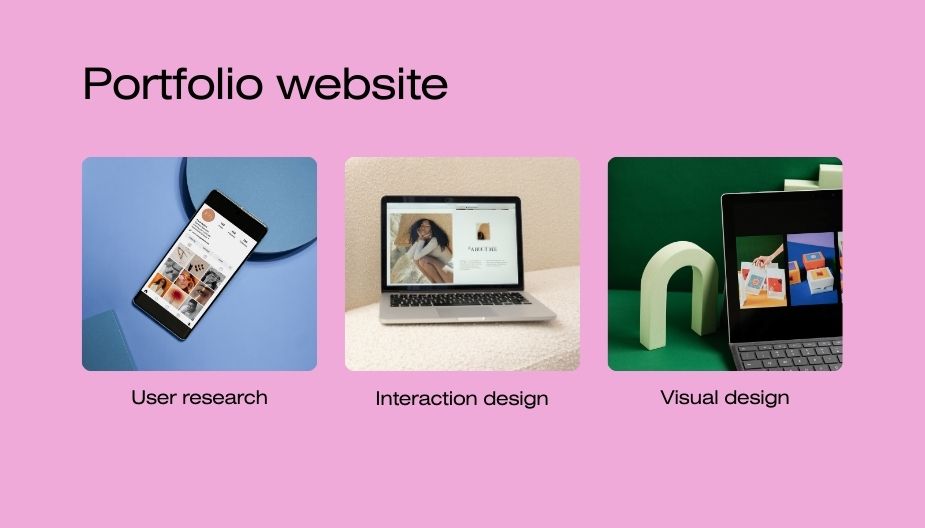
How to Create a Website for a Portfolio in 2026
In today’s digital world, having a portfolio website is one of the most powerful ways to showcase your work. Whether you are a designer, developer, writer, photographer, marketer, or freelancer, a professional portfolio website helps you present your skills clearly.
Instead of sending files, resumes, or screenshots of your work, you can simply share your website link. As a result, potential clients or employers can quickly explore your projects and understand your expertise.
Moreover, a portfolio website helps you build a strong online presence. When someone searches your name online and finds a professional website, it immediately creates trust and credibility.
In this complete guide, you will learn:
- Why a portfolio website is important
- Common problems people face when creating one
- Step-by-step instructions to build your own portfolio website
- SEO tips to help your website appear on Google
- Practical tips to make your portfolio look professional
Let’s get started.
Why a Portfolio Website Is Important
A portfolio website acts as your digital identity. It allows you to present your work in a structured and professional way. In addition, it gives you complete control over how your projects are displayed.
Build Professional Credibility
A professional portfolio shows that you take your work seriously. When clients or employers visit your website, they can immediately see your skills and experience.
Furthermore, a well-designed website creates a strong first impression. People often judge professionalism based on presentation, so a portfolio website can help you stand out.
Showcase Your Work Clearly
Social media platforms limit how you present your work. However, a portfolio website allows you to include detailed explanations, images, and case studies.
Because of this, visitors can understand the value of your work more easily.
Attract Clients and Opportunities
Many freelancers and professionals get new opportunities through their portfolio websites. When your website clearly shows your skills, visitors are more likely to contact you.
In addition, your portfolio can include a contact form, service descriptions, and testimonials. Therefore, it can work as a powerful tool for business growth.
Common Problems People Face When Creating a Portfolio Website
Although portfolio websites are important, many people delay creating one. Several common problems often prevent them from getting started.
Belief That Coding Is Required
Many beginners assume that building a website requires advanced coding skills. Because of this belief, they feel overwhelmed before even starting.
However, modern website builders make the process much easier. Today, you can create a professional website without writing a single line of code.
Confusion About Where to Start
Another common challenge is lack of direction. People often ask questions like:
- Which platform should I use?
- How much does it cost?
- What pages should my portfolio include?
Without clear guidance, many people postpone the process.
Fear of High Costs
Some individuals believe that creating a website costs hundreds or thousands of dollars. In reality, a basic portfolio website can be built at a relatively low cost.
For example, domain names and hosting services are often affordable, especially for beginners.
Perfectionism
Many talented professionals feel that their work is not ready to be displayed online. However, waiting for perfection often delays progress.
Instead, it is better to launch a simple portfolio first and improve it over time.
Step-by-Step Guide to Creating a Portfolio Website
Fortunately, building a portfolio website today is easier than ever. By following a few clear steps, you can create a professional website even if you are a beginner.
Step 1: Choose the Right Platform
First, you need to select a platform for building your website. Different platforms offer different features, so choosing the right one is important.
WordPress
WordPress is one of the most popular website platforms in the world. It offers strong customization options and powerful SEO features.
Because of its flexibility, many professionals prefer WordPress for portfolio websites.
Wix
Wix provides a simple drag-and-drop website builder. As a result, beginners can create websites quickly without technical knowledge.
Squarespace
Squarespace is known for modern and visually attractive templates. Therefore, it is often used by photographers, designers, and creative professionals.
When selecting a platform, consider ease of use, design options, and long-term scalability.
Step 2: Buy a Domain Name
A domain name is your website address. For example:
yourname.com
Ideally, your domain name should be simple and memorable.
Here are a few tips for choosing a good domain name:
- Use your real name if possible
- Keep the name short and clear
- Avoid numbers and hyphens
- Choose a .com extension if available
A professional domain name helps strengthen your personal brand.
Step 3: Get Reliable Website Hosting
Website hosting stores your website files and makes them accessible online.
Several popular hosting providers include:
- Hostinger
- SiteGround
- Bluehost
- Namecheap
Good hosting improves website speed and security. In addition, fast websites provide a better user experience.
Because website speed is also a search engine ranking factor, reliable hosting is important.
Step 4: Install Your Website Builder
After purchasing hosting and a domain name, you can install your website platform. Most hosting providers offer one-click installation for popular platforms like WordPress.
Typically, the process includes the following steps:
- Log in to your hosting dashboard
- Choose the WordPress installation option
- Select your domain name
- Create login credentials
Once the installation is complete, your website will be ready for customization.
Step 5: Choose a Professional Theme
Your website theme controls the design and layout of your pages. Therefore, selecting the right theme is an important step.
A good portfolio theme should be:
- clean
- responsive
- easy to navigate
- visually balanced
Minimal designs often work best because they keep the focus on your work.
Important Pages Every Portfolio Website Needs
A professional portfolio website usually includes several essential pages.
Home Page
The homepage should introduce you clearly. It should explain who you are and what you do.
For example:
“Hi, I’m Alex, a UI/UX designer helping startups create better digital experiences.”
In addition, the homepage should include links to your portfolio and contact page.
About Page
The about page tells your story. Instead of listing only technical skills, explain your journey and motivations.
You may include:
- your background
- professional experience
- achievements
- personal values
Storytelling makes your portfolio more memorable.
Portfolio Page
The portfolio page is the most important part of your website. It displays the projects that represent your skills.
Each project should include:
- project overview
- your role in the project
- challenges you faced
- solutions you implemented
- results achieved
This format helps visitors understand your work in detail.
Services Page
If you offer freelance services, a services page is essential. It should clearly describe what you offer and who you help.
For example, services might include:
- web design
- graphic design
- content writing
- branding
Clear descriptions help visitors understand your expertise.
Contact Page
The contact page makes it easy for visitors to reach you. Ideally, it should include:
- a contact form
- email address
- social media links
Some professionals also add a short message encouraging visitors to start a project conversation.
How to Add Your Best Projects
When building your portfolio, quality matters more than quantity. Instead of adding many average projects, choose your strongest work.
Each project should demonstrate your skills clearly.
In addition, include visual elements such as images, screenshots, or mockups. Visual content helps visitors understand your work faster.
You should also explain the problem you solved and the outcome of the project. This approach turns simple examples into compelling case studies.
SEO Tips to Help Your Portfolio Website Rank on Google
Search engine optimization helps your website appear in search results. Without SEO, even a well-designed portfolio might remain unnoticed.
Use Relevant Keywords
First, include relevant keywords in your headings and page titles. For example:
- portfolio website
- freelance designer portfolio
- personal portfolio website
However, keywords should appear naturally within the content.
Optimize Images
Images are important for portfolio websites, but large image files can slow down loading speed.
Therefore, compress images before uploading them. Additionally, use descriptive file names and alt text.
For example:
web-design-dashboard-project.jpg
This helps search engines understand your content.
Ensure Mobile Friendliness
Many users browse websites on smartphones. Because of this trend, mobile optimization is essential.
Your website should display correctly on smaller screens and load quickly on mobile networks.
Add Blog Content
Blogging can significantly increase website traffic. By publishing useful articles related to your field, you attract visitors through search engines.
For example, a designer might write about design trends, while a developer might share coding tutorials.
Over time, this content strengthens your website’s visibility.
Common Mistakes to Avoid
While building a portfolio website, it is important to avoid several common mistakes.
Overloading the Website With Information
Too much content can overwhelm visitors. Instead, keep the layout clean and focused.
Poor Navigation
Visitors should easily find important sections such as the portfolio, about page, and contact page. Clear navigation improves the user experience.
Slow Website Speed
Slow websites often cause visitors to leave quickly. Therefore, optimize images and choose reliable hosting.
Future Trends in Portfolio Websites
Portfolio websites continue to evolve as technology advances. Many modern portfolios include interactive features and visual storytelling.
For example, some websites use animations, video presentations, or interactive case studies.
However, simplicity remains important. Clean design and clear communication will always be essential elements of a strong portfolio.
📌 Related Article
Best AI Tools for Small Businesses in 2026 – Complete GuideDiscover the best AI tools that help small businesses improve productivity, automate tasks, and grow faster in 2026.
Final Thoughts
Creating a portfolio website is one of the best investments you can make in your professional career. It allows you to showcase your work, share your story, and attract new opportunities.
Fortunately, modern tools make website creation easier than ever. Even beginners can build professional websites by following a few simple steps.
Start by choosing the right platform and purchasing a domain name. Then create your essential pages and add your best projects.
Finally, optimize your website for search engines and share it with your network.
Over time, your portfolio website will grow alongside your experience. As you complete new projects and gain new skills, you can continue improving and expanding your portfolio.
Most importantly, remember that your portfolio does not need to be perfect on the first day. What matters is taking the first step and building your online presence..





One Comment